Find Friends Family Locator
- 3.5
- Rating
- 1.00M
- Installs
- Free
- Price

 Analysis by App-foxy
When I test a family location app, I care less about a crowded map than about what happens when someone is already late, a phone is nearly out of battery, or a location takes longer than expected to appear. Find Friends Family Locator, developed by synchronise, takes a straightforward approach: it is a free parenting app built around sharing locations and helping people find friends. I found its appeal easy to understand, especially for families who want a simple way to coordinate without constantly sending messages such as “Where are you now?”
The app is available to everyone, runs on Android devices using version 7.0 or later, and has reached over a million installs. Its average rating sits at 3.5 from around 3,000 ratings, alongside more than 200 written reviews. Those figures suggest a useful but uneven experience rather than a universally smooth one. My impression is similar: the basic idea is practical, but the value depends heavily on how consistently every person in the group keeps location sharing available.
How Find Friends Family Locator feels in everyday use
I find Find Friends Family Locator most useful when the family agrees in advance what a location check is meant to answer: whether someone has left, is nearing a meetup, or has reached a familiar area. That small bit of context keeps a map from becoming a substitute for conversation. It also leads to the question I would consider before inviting anyone in: what can each person actually control about sharing?
You May Also Like

 Blood Strike: 2.5 Anniversary
Blood Strike’s Loadouts Turn Every Drop Into a Tactical Gamble
A close look at Blood Strike’s custom loadouts: how fast access to signature weapons reshapes its battle royale rhythm, rewards preparation, and narrows the gap between fights.

 Pandora - Music & Podcasts
Pandora’s Music Is Easy to Start, but Harder to Recover
Pandora’s strength is its low-effort path from a seed to a station. Its weak spot is how much confidence it asks you to place in connection, setup, and quiet recovery.

 8 Ball Pool
 Is Built on Rivalries, Rematches, and Routine
A close look at the rivalries, rematches, shared routines, and unanswered safety questions that turn a quick pool match into a persistent mobile community.

 Samsung Music
’s Quiet Strength Is Playing What You Already Own
Its reach comes less from spectacle than from dependable access to a personal library. That simplicity is both the app’s strongest retention engine and its ceiling.

 AccuWeather: Weather Radar
AccuWeather Review: A Quick, Clear Forecast for Everyday Decisions
For everyday plans, the best forecast is the one you can understand quickly. AccuWeather makes rain timing, radar, and local conditions easy to act on, with a few trade-offs.

 Hill Climb Racing
Why Hill Climb Racing Still Turns Crashes Into One More Run
A tiny car, a bumpy hill and one more upgrade: Hill Climb Racing keeps resurfacing because its simple chaos makes every near-miss feel personal.
More From Our News Desk



Speed expectations when you need an answer quickly
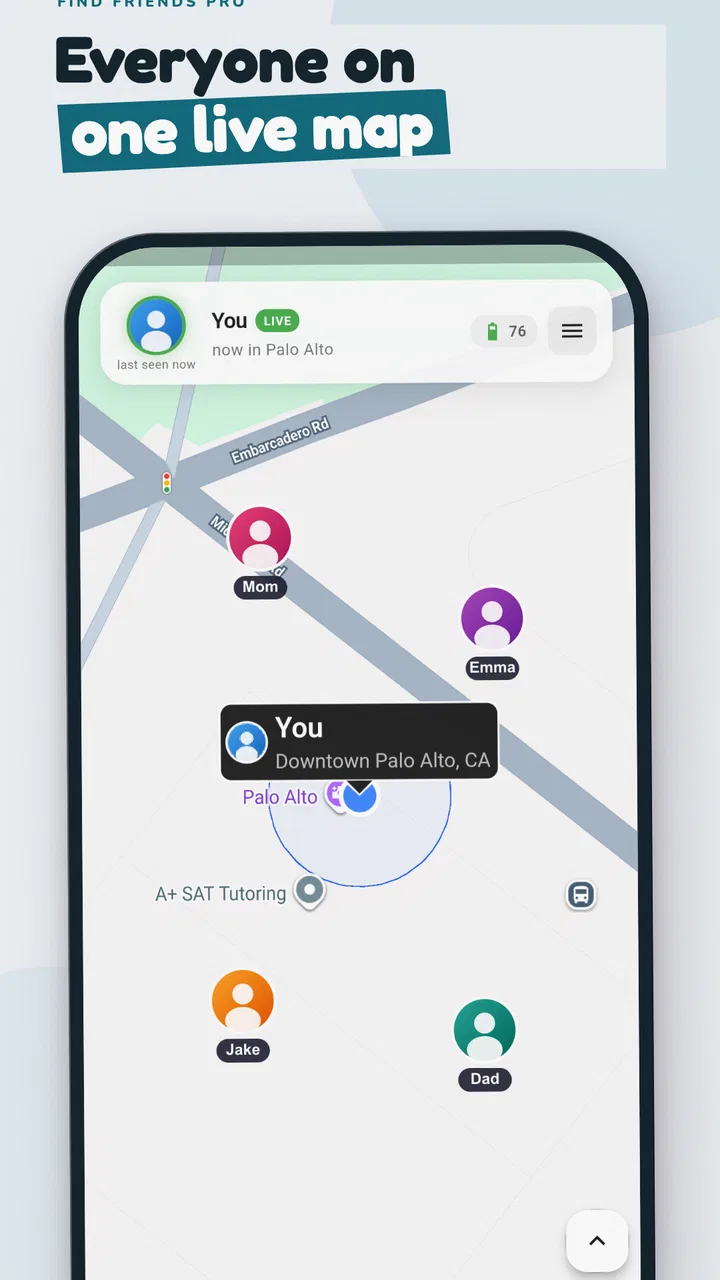
The main strength of a location-sharing tool is reducing uncertainty. In a normal family routine, I can imagine using it before school pickup, during a shopping trip, or when several people are meeting at a busy place. Instead of asking each person to describe where they are, the shared map gives everyone a common reference point. That is more useful than a long message thread when plans change several times during the day.
At the same time, I would not treat a displayed position as a live, second-by-second guarantee. Location apps depend on the phone being able to determine and transmit its position, so a marker may represent a recent update rather than the person’s exact current spot. That distinction matters when someone is moving between buildings, travelling through areas with weak reception, or carrying a phone that is trying to reduce background activity.
My practical advice is to use the app for coordination, not precision-critical decisions. It can help you decide whether to wait at the entrance or start walking toward a meeting point. It should not replace a call when a child is expected at a specific time and the map has not refreshed. A quick message or phone call remains the sensible backup.
One useful habit is to agree on a meeting routine before anyone leaves. For example, family members can decide that a person who appears near a shopping centre should still send a message when they reach the agreed entrance. This prevents the common mistake of assuming that a map marker automatically communicates arrival, safety, or intent.
What happens during heavier family use
Find Friends Family Locator is most demanding when several people rely on it at once: a parent checking on a child after school, another adult travelling across town, and everyone opening the map repeatedly while plans change. In that situation, the app’s usefulness depends on clear expectations. A location-sharing app is not only a map; it is a shared habit that requires each participant to keep the service usable on their own phone.
I would set it up during a calm moment rather than in the middle of an urgent pickup. Add the people who genuinely need access, explain why the app is being used, and make sure everyone understands when location sharing is expected. This is especially important with older children and teenagers. A family locator works better when it is part of an agreed safety plan rather than something introduced as silent surveillance.
There is also a trade-off between convenience and phone resources. Frequent location activity can be more noticeable than occasional manual sharing, particularly on an older handset or a device already handling navigation, streaming, and messaging. I would avoid leaving several power-hungry activities running during a long day and would remind family members to charge before travelling. The app is much less helpful if the phone shuts down before the person reaches home.
A second practical tip is to avoid checking constantly. Repeatedly reopening the map can create anxiety without improving the information available. A better workflow is to check around agreed milestones: leaving school, arriving at an activity, beginning the journey home, and reaching the destination. That turns the app into a coordination tool instead of an endless source of uncertain updates.
Reliability and recovering from an unclear location
Reliability here should be judged by recovery as much as by the first location display. If a marker looks old or does not appear where expected, I would first check whether the person has a working connection, whether the phone is still powered on, and whether they have recently moved indoors or underground. These basic checks often explain more than the map itself.
When a location seems wrong, the safest response is not to keep refreshing indefinitely. I would contact the person directly, ask them to open the app when possible, and confirm a simple landmark. If that fails, the family should fall back to the arrangement they made before using the app. This recovery process is important because every locator can become misleading when the phone cannot provide a fresh position.
The app’s rating indicates that the experience is not flawless for everyone. I would therefore recommend a short trial with the actual family phones before depending on it for a regular school run or an important journey. Test it at home, then repeat the test outdoors and in the places where the family normally travels. That gives you a more realistic sense of how dependable the setup feels on your devices.
Another overlooked point is that reliability is social as well as technical. A family member may forget to keep sharing enabled, leave the phone in a bag, or assume another person has already seen the update. Clear names and a simple check-in rule reduce these misunderstandings. The app can show a location, but it cannot solve an unclear family routine by itself.
Device constraints that may shape the experience
The stated minimum operating system is Android 7.0, which makes the app accessible to many older Android phones. That is helpful for families who do not all use recent devices. However, an older compatible phone may still behave differently from a newer one because of battery condition, available storage, connection quality, or the way the device manages apps running in the background.
I would pay particular attention to the least capable phone in the group. The newest handset may update comfortably while an older family phone struggles with battery drain or delayed activity. If one person’s location repeatedly appears late, compare the experience across devices before blaming the whole service. The problem may be local to that phone or its network environment.
Parents should also think about the child’s age and independence. The content rating is Everyone, but an age label does not replace a family conversation about privacy. Explain who can see the location, when sharing is useful, and what to do if the child wants to ask a question about it. That approach is more respectful and usually produces better cooperation than presenting the app as an invisible tracking system.
For a short outing, I would use the app alongside normal safety habits: a charged phone, an agreed destination, and a contact method that everyone knows. For a long trip, I would add a charging cable or power bank. This is not a special requirement of one particular app; it is a sensible response to the fact that location sharing has little value once the device loses power.
Useful workflows beyond simply watching a map
The most useful way to approach this app is to build small routines around it. A family leaving for a crowded event can share locations while travelling, then agree to meet at a fixed landmark if anyone gets separated. The map helps people move toward the same place, while the landmark prevents everyone from wandering around based on slightly different readings.
It can also help with practical handoffs. Suppose one parent is collecting a child from an activity while another is finishing work. The first parent can use the shared location to judge whether the second adult is close enough to take over, then confirm the handoff directly. This is more efficient than sending a series of approximate arrival times, but I would still use a message for the final confirmation.
A third use is temporary group coordination among friends. During a day out, sharing can make it easier to regroup after visiting different parts of a venue. In this case, I would keep the group small and purposeful. Adding every acquaintance may make the map confusing and can create unnecessary privacy concerns. The app is better when each shared connection has a clear reason.
There is a subtle trade-off in using a family locator for reassurance. Seeing that someone is moving along a familiar route can be comforting, but a map can also invite overchecking. I would set boundaries around when the app is consulted and reserve direct contact for situations that genuinely need attention. Used with restraint, it can reduce needless messages; used constantly, it may increase worry.
Cost, version, and what to expect from the free option
Find Friends Family Locator is free to install, which makes it easy to try with the whole family before deciding whether it fits. The app includes in-app purchases ranging from $2.99 to $119.99 per item. Because those purchases can vary widely in cost, I would review each purchase screen carefully and avoid assuming that every useful function is included in the free experience.
The current version is 138, so the app has continued through a substantial sequence of updates since its release on July 22, 2019. I see that as a reason to keep the app updated when possible, especially if a family depends on it regularly. Updates can also change the way an app behaves on different phones, so I would test the key workflow again after a major update rather than discovering a change during an urgent trip.
The developer, synchronise, has positioned the product for a broad audience rather than only for technical users. The interface concept is easy to explain to a friend: share a location, open the map, and use it to coordinate. The harder part is not learning the idea; it is making sure the entire group uses it consistently and understands its limits.
How it compares with ordinary alternatives
The usual alternative is messaging. A message is often better when you need context: “I am at the rear entrance,” “I am running ten minutes late,” or “Please meet me beside the café.” Find Friends Family Locator is more convenient when several people need a shared visual view and nobody wants to describe their position repeatedly.
Phone calls remain the stronger option when the situation is urgent or the map looks stale. A call can confirm that the person is safe and can reveal what the location marker cannot, such as a blocked entrance or a change of plan. I would never make the app the only safety channel for a child travelling alone.
Compared with a built-in platform location service, this app may appeal to people who want a dedicated family-focused tool rather than a feature buried inside a broader account or messaging ecosystem. On the other hand, people who already have a location-sharing system that every family member understands may not gain enough to justify switching. The best choice is the one that the whole group can operate reliably, not necessarily the one with the most prominent map.
For parents who want extensive supervision, activity reports, or controls beyond location sharing, I would look at a more specialized parental-control product. Find Friends Family Locator is better suited to knowing where people are and coordinating meetups than to managing every aspect of a child’s phone use.
Who should use it and who should skip it
I think this app is a good fit for families that regularly split up during errands, school activities, commuting, or weekend outings. It is also useful for small groups of friends who want a shared way to regroup without posting their whereabouts publicly. The free starting point makes experimentation straightforward, while support for Android 7.0 and later helps include older phones.
I would be more cautious if your household needs guaranteed real-time accuracy, detailed historical reporting, or a full parental-control suite. The app should also be skipped as a sole emergency plan. If a family member is in danger, direct contact and local emergency services matter more than waiting for a map to update.
Privacy-conscious users should think carefully about who receives access and when. Share only with people who need it, remove connections that no longer make sense, and discuss the arrangement openly with children. A location tool is most responsible when everyone understands its purpose and the family avoids treating constant visibility as a measure of trust.
My performance verdict
My overall view is that Find Friends Family Locator is a sensible, accessible option for basic family coordination, but it rewards realistic expectations. Its perceived speed can be good enough for meeting up and checking progress, yet I would not confuse a displayed marker with a guaranteed live position. Its stability is likely to feel strongest when phones are charged, connected, and used within a clear routine.
The app’s biggest practical advantage is simplicity: it gives families a shared location-focused workflow instead of making every person describe where they are. Its main weakness is that the experience can become uncertain when a phone is offline, low on power, poorly positioned for location detection, or simply not being used as expected. Those limitations are manageable if the family keeps a direct contact method and agrees on fallback steps.
After trying to judge it as a real household tool rather than a novelty, I would recommend starting with a small group and a low-pressure test. Use it for an ordinary outing, compare the map with known locations, notice how quickly everyone understands the routine, and then decide whether it deserves a permanent place in your family’s plans. Its best role is a convenient layer of coordination, not a replacement for communication or common sense.
For families who want exactly that—an uncomplicated way to find friends and share locations—this free parenting app is worth exploring. For anyone expecting perfect tracking, deep supervision controls, or emergency-grade certainty, a different category of tool will be a better match. In my experience, the app succeeds when it stays focused: fewer “Where are you?” messages, clearer meetups, and a sensible backup when the map cannot tell the whole story.
FAQs for Find Friends Family Locator
01What is Find Friends Family Locator and how does it work?
Find Friends Family Locator is designed to help approved contacts share their location and stay connected. After installing the app, users generally create or join a private circle, invite family members or friends, and enable location permissions. Depending on the available features, the app may show current or recent locations on a map, provide arrival notifications, and support communication within the group.
02Is Find Friends Family Locator free to download and use?
The app may be available to download at no initial cost, but some tools can require a subscription or in-app purchase. Premium features may include longer location history, additional alerts, larger private groups, or enhanced safety options. Before subscribing, review the pricing, trial period, renewal terms, and cancellation instructions shown in the Google Play Store or Apple App Store.
03Does everyone need to install Find Friends Family Locator?
For reliable location sharing, each person whose location will be displayed usually needs to install the app, create or join the appropriate private group, and grant the required permissions. Invitations alone do not automatically provide access to someone’s location. Every participant should understand what information is shared and accept the invitation voluntarily before tracking features are enabled.
04What permissions does Find Friends Family Locator require?
A family locator normally requests access to location services, notifications, and sometimes background activity, contacts, or motion-related information. Background location may be necessary for updates when the app is not open, but it can increase battery usage. Check the permission prompts carefully, choose the least invasive option that supports your needs, and review access regularly in your device settings.
05Can Find Friends Family Locator track someone without their knowledge?
A legitimate family-location service should rely on consent, invitations, and visible participation rather than secret monitoring. You should never use the app to track another person without permission, especially because location data is sensitive and misuse can create safety and legal concerns. Before using it, discuss the arrangement with family members and confirm who can view each person’s location.
Pros
- Real-time location sharing helps coordinate meetups and family plans.
- Geofenced place alerts can notify you when someone arrives or leaves.
- Emergency features make it easier to share your location when needed.
- Location history may help review recent trips and routine movements.
- Simple map-based interface is accessible for users with limited tech experience.
Cons
- Continuous GPS use can noticeably reduce battery life on some phones.
- Accurate tracking depends on mobile data
- GPS
- and a reliable internet connection.
- Some useful features may require a paid subscription or in-app purchase.
- Location sharing raises privacy concerns if permissions and circles are unmanaged.
- Alerts may be delayed or inaccurate indoors
- underground
- or in weak-signal areas.

Find Friends Family Locator
Gallery